A guide for DBMC staff: download the Lark app, join the organization via QR code or invite link, sign in and complete your profile — in just a few minutes.
Lark is DBMC's workplace: messaging, video calls, Calendar, Docs and company Email in one app. Choose your device to download.
App Store · iOS
Google Play
Official download page
Download for every platform (Windows, macOS, Linux, iOS, Android) on the official page:
Once Lark is installed, join the organization using one of the three methods below. Please register with your company @dbmc.io email.
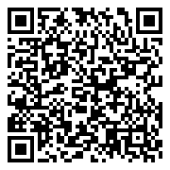
Open Lark → the + icon → Scan
Tap the link on a phone that has Lark installed to join directly.
WRGL ZJPJ
In Lark: Add (+) → Join an organization → enter the code.
The QR code & link are valid until 23:00 on 06 Aug 2026. If expired, please contact support.
Finish the steps below to be ready to work on the DBMC system.
Prefer registering with your @dbmc.io address so you're placed in the right org and department.
The QR code and invite link are for DBMC staff only. Do not share or post them publicly.
Go to Settings → Language in the Lark app to switch language.
Contact support: info@dbmc.io